Showing posts with label xerox. Show all posts
Showing posts with label xerox. Show all posts
Free Download XEROX Series printer Service Manua

Xerox 4003 5.5 Mb
Xerox 4004 5.5 Mb
Xerox DocuColor 1632 12.3 Mb
Xerox DocuColor 1632 33.6 Mb
Xerox DocuColor 2006 10.5 Mb
Xerox DocuColor 2240 12.3 Mb
Xerox DocuColor 2240 33.6 Mb
Xerox DocuPrint N17 30.9 Mb
Xerox DocuPrint N24 44.7 Mb
Xerox DocuPrint N32 44.7 Mb
Xerox DocuPrint N2025 12.6 Mb
Xerox DocuPrint N2825 12.6 Mb
Xerox DocuPrint N3225 44.7 Mb
Xerox DocuPrint N40 44.7 Mb
Xerox DocuPrint N4025 44.7 Mb
Xerox DocuPrint P1202 7.0 Mb
Xerox Laser printer 4010 12.7 Mb
Xerox P8E 8.1 Mb
Disc contents
Xerox Phaser-DocuPrint Disc.part01 50.5 Mb
Xerox Phaser-DocuPrint Disc.part02 50.5 Mb
Xerox Phaser-DocuPrint Disc.part03 50.5 Mb
Xerox Phaser-DocuPrint Disc.part04 50.5 Mb
Xerox Phaser-DocuPrint Disc.part05 50.5 Mb
Xerox Phaser-DocuPrint Disc.part06 50.5 Mb
Xerox Phaser-DocuPrint Disc.part07 50.5 Mb
Xerox Phaser-DocuPrint Disc.part08 50.5 Mb
Xerox Phaser-DocuPrint Disc.part09 50.5 Mb
Xerox Phaser-DocuPrint Disc.part10 10.6 Mb
Xerox WorkCentre pe220 355.3 Kb
Xerox WorkCentre pe220 5.6 Mb
Xerox WorkCentre pro 420 15.1 Mb
Xerox WorkCentre pro 420 15.1 Mb
Xerox WorkCentre XK40c 9.8 Mb
Xerox Phaser 140 220.1 Kb
Xerox Phaser 200 3.8 Mb
Xerox Phaser 340 17.7 Mb
Xerox Phaser 360 14.1 Mb
Xerox Phaser 380 12.0 Mb
Xerox Phaser 381 1.6 Mb
Xerox Phaser 440 4.0 Mb
Xerox Phaser 480 4.0 Mb
Xerox Phaser 500 4.9 Mb
Xerox Phaser 560 3.9 Mb
Xerox Phaser 600 8.6 Mb
Xerox Phaser 740 5.2 Mb
Xerox Phaser 750 4.7 Mb
Xerox Phaser 780 13.0 Mb
Xerox Phaser 790 10.5 Mb
Xerox Phaser 790 12.3 Mb
Xerox Phaser 840 6.6 Mb
Xerox Phaser 840 20.7 Mb
Xerox Phaser 840 20.7 Mb
Xerox Phaser 841 9.9 Mb
Xerox Phaser 850 6.6 Mb
Xerox Phaser 850 16.8 Mb
Xerox Phaser 860 6.6 Mb
Xerox Phaser 3100mfp 6.6 Mb
Xerox Phaser 3100mfp 6.6 Mb
Xerox Phaser 3124 227.5 Kb
Xerox Phaser 3125 227.5 Kb
Xerox Phaser 3150 4.0 Mb
Xerox Phaser 3200mfp, 5.6 Mb
Xerox Phaser 3200mfp 355.3 Kb
Xerox Phaser 3435 12.6 Mb
Xerox Phaser 3500 11.4 Mb
Xerox Phaser 4500 4.4 Mb
Xerox Phaser 4510 4.4 Mb
Xerox Phaser 6100 10.5 Mb
Xerox Phaser 8200 6.6 Mb
Xerox Phaser 8400 6.3 Mb
Xerox Phaser 8500 6.3 Mb
Xerox Phaser 8550 6.3 Mb

Xerox FaxCentre 2218 config page
On the FaxCentre 2218, you can print out a system data list which gives a good breakdown of the machines settings. To print the system data list:
- Press the Machine Status button
- Scroll down until "Reports" is displayed on the screen
- Press Enter
- Scroll to the right until "System Data" is displayed
- Press Enter
Note that the machines page count is not displayed on the system data list. If you want to see the page count, print out a counter report instead. (Select "Billing/Counters" from the Reports menu instead of "System Data".)
Continue reading..
- Press the Machine Status button
- Scroll down until "Reports" is displayed on the screen
- Press Enter
- Scroll to the right until "System Data" is displayed
- Press Enter
Note that the machines page count is not displayed on the system data list. If you want to see the page count, print out a counter report instead. (Select "Billing/Counters" from the Reports menu instead of "System Data".)
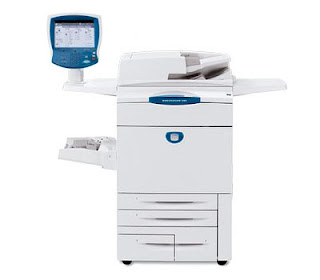
Xerox DocuColor 252 Color 3 in 1
PROS:
The first thing that grabs your attention on the DocuColor 252 is the prominently positioned blue control panel. The touch screen User Interface (UI) gives easy access to popular functions, with additional menus for all of the DocuColor’s features. A traditional 10-keypad is provided along with the buttons most users are used to using with copiers.
One of the nice features of this multifunction is it can multitask. A person can scan or copy directly on the DocuColor while print jobs are being performed via the network.
The DocuColor 252 prints at speeds up to 50 pages per minute in color, 65 single-sided pages per minute in black-and-white. Having one of the highest resolutions at 2,400 x 2,400, it gives you professional high-image quality and clarity. The polymerized toner helps enhances definition and sharpness. The adjustable enhanced gloss level gives a photographic quality to printed images.
The duplexing Automatic Document Feeder (ADF) can handle the copying and scanning of your 2-sided originals, be they in color or in B&W. With a 250-sheet capacity, it handles about twice the amount of other ADFs.
The DocuColor 252 comes with two 500-sheet cassette trays, an 870-sheet and a 1,140-sheet tandem tray that supports papers from 8½ “x 11” up to 11” x 17”. A 250-sheet multi-purpose bypass tray handles various paper weights and sizes up to 13” x 19”.
The 252 comes standard with Ethernet. 512MB of memory and an 80GB hard drive enables this DocuColor to handle any size print request and to securely save jobs to the hard drive.
Color copies up to 13” x 19” can be made directly on the glass platen, or using the Automatic Document Feeder (ADF). The duplexing ability of the ADF allows for making copies from 2-sided originals without having to manually flip the papers. Zoom ranges from 25% to 400% with a choice of 1% increments, automatic resizing, or in ten jumps. Up to 9,999 copies can be reproduced. Resolution and print speeds are spec’d at 2,400 x 2,400 dpi and by scanning one time and storing the images to memory allows for copying speeds of 65 ppm. You can choose if copies are to be collated or stacked into the offset catch tray.
Scanned documents can be exported as 600 x 600 PDF files and sent to a network directory, e-mail, or on the internal hard drive.
Three optional Finishers can give the DocuColor 252 full publishing features including staple, multi-hole punch, Z, C, and V-folding and binding for catalogs and magazines. The DocuColor is able to interface with 3rd party peripherals such as magnetic strip readers (for ID cards) and coin machines, to expand its functions beyond the workplace to universities and self-serve copy stores.
CONS:
In spite of Xerox’s claims, you don’t want to just plop anybody in front of this unit without some training. As a support engineer, I found the most downtime for machines of this size comes when untrained people start “using” them. Since most buyers of DocuColors and WorkCentres will want to establish passwords and user accounts for auditing and security, the end-user will need to be taught the basics (like what their password is). With a 1-hour training and “lab”, I‘ve been able to get the most technophobic people productive on these office machines. Here’s where an hour of prevention is worth days of non-productivity.
Normally multifunction printers have identical resolutions for scan and copy functions, often with the scanning resolutions being higher. While it’s not a big issue, it is interesting that the DocuColor 252 is only spec’d to have a 600 x 600 dpi resolution in scan mode.
INK / TONER NEEDS:
The DocuColor uses Xerox’s Emulsion Aggregate toner, a resin-like ink for sharper imaging and less color bleeding. Prints that use polymerized toners like EA tend to have a nice glossy look and a waxy feel to them.
Dual black cartridges allow for easy changing of the highest consumed item without stopping the printer. Each black toner provides 5% coverage on 30,000 pages, and the three colors 34,000 pages. Just remember that if you’re doing full-color spread layouts and photograph prints, the actual toner usage per page is going to be at least 10 times more, reducing the number of pages you can get out of a cartridge.
The toner can be purchased separately, especially if the yellow toner gets consumed the most. To save on costs, toner combo-packages are also available.
Other consumables to consider are replacement of the imaging units (drums) every 65,000 prints (150,000 for black), the fuser and transfer roller (every 160,000 images), and the waste toner bottle.
Xerox Phaser 6360
I bought the Xerox Phaser 6360 color printer in late 2007 when I first started my web studio. It seemed like a good idea at the time, I knew the Xerox name from when I work in for corporations and knew it gave good copies. I didn’t know at the time that they did printers too.
I wanted something middle of the road that could service my small office of three people, while not breaking the bank. I often print on non-legal sized paper so wanted something that could cope with that, and also that had a paper tray that could handle it. There’s nothing worse than having to stand in front of a printer and hand-feed envelopes or A3 into it.
The 6360 is all I wanted, and more. It only takes around 10 seconds to warm up, and the first print in out a few seconds after that, it prints up to 40 pages per minute, which is plenty enough for my needs. I was a little worried at first, because I would rather have great prints take a little longer, than worry about a fast printer that produced sub-standard images. I needn’t have worried, this printer is fast, but it also prints well.
I’m in design so I’m pretty exact in my requirements. Print quality is excellent with text and basic images. Lasers have never been that good with photographs or more complex images. The 6360 does Xerox proud. Image reproduction is excellent, color gradiations are accurate and clear. There is no evidence of banding, or the criss-crosses that some printers give when faced with a complex print job.
The paper trays hold 700 sheets as standard. Like I said, they can also handle non-standard sizes. They can also be expanded if you print a lot, to 2350 sheets, which then makes the printer able to stand on the floor. The duty cycle is 100000 sheets per month, although I don’t use it anywhere near that much, it’s nice to know the kit can handle it if I need it to.
Setting it up was a breeze. Once it was unpacked, I installed the toner, and connected it up to the network. It appeared in my workgroup in around 20 seconds and once the drivers were installed we could all use it straight away. I have a mix of Windows and Mac machines, and they can all use the printer. The 6360 also supports PostScript 3 which means it not only prints text quickly, it also works with my Adobe suite without any messing around.
I like this printer, for an office machine it does exactly what it says on the box. It’s easy to use, not too noisy, easy to look after and not too expensive. The toners last for about 9000 pages and I can get them online from Quikship toners delivered next day.
Cost of ownership is low, it does what I want it to do and hasn’t let me down yet. I thoroughly recommend it.
Continue reading..
I wanted something middle of the road that could service my small office of three people, while not breaking the bank. I often print on non-legal sized paper so wanted something that could cope with that, and also that had a paper tray that could handle it. There’s nothing worse than having to stand in front of a printer and hand-feed envelopes or A3 into it.
The 6360 is all I wanted, and more. It only takes around 10 seconds to warm up, and the first print in out a few seconds after that, it prints up to 40 pages per minute, which is plenty enough for my needs. I was a little worried at first, because I would rather have great prints take a little longer, than worry about a fast printer that produced sub-standard images. I needn’t have worried, this printer is fast, but it also prints well.
I’m in design so I’m pretty exact in my requirements. Print quality is excellent with text and basic images. Lasers have never been that good with photographs or more complex images. The 6360 does Xerox proud. Image reproduction is excellent, color gradiations are accurate and clear. There is no evidence of banding, or the criss-crosses that some printers give when faced with a complex print job.
The paper trays hold 700 sheets as standard. Like I said, they can also handle non-standard sizes. They can also be expanded if you print a lot, to 2350 sheets, which then makes the printer able to stand on the floor. The duty cycle is 100000 sheets per month, although I don’t use it anywhere near that much, it’s nice to know the kit can handle it if I need it to.
Setting it up was a breeze. Once it was unpacked, I installed the toner, and connected it up to the network. It appeared in my workgroup in around 20 seconds and once the drivers were installed we could all use it straight away. I have a mix of Windows and Mac machines, and they can all use the printer. The 6360 also supports PostScript 3 which means it not only prints text quickly, it also works with my Adobe suite without any messing around.
I like this printer, for an office machine it does exactly what it says on the box. It’s easy to use, not too noisy, easy to look after and not too expensive. The toners last for about 9000 pages and I can get them online from Quikship toners delivered next day.
Cost of ownership is low, it does what I want it to do and hasn’t let me down yet. I thoroughly recommend it.
Subscribe to:
Posts (Atom)