Reset Epson T50 and T60 without error 21000068
Here the reset method from Jagdish Rathore:
- Turn off printer and open printer.
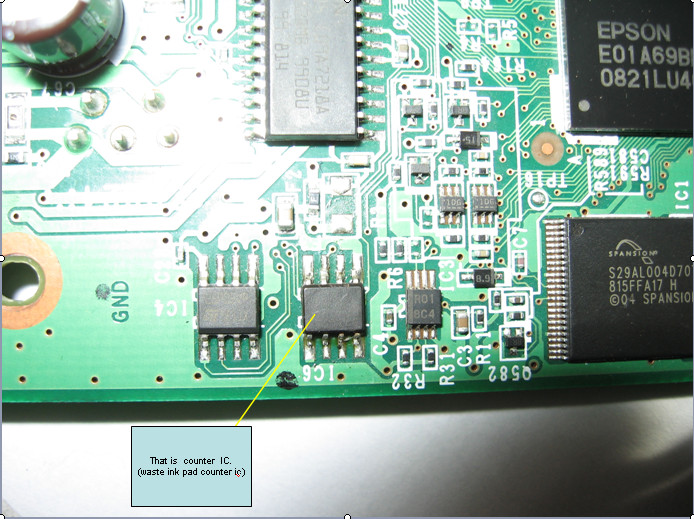
- Open your Epson main PCB board. You can view an 8 pin CMOS IC. That is Epson waste ink counter IC and found on all Epson Printer.
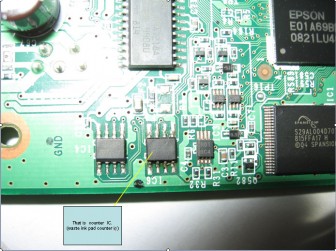
- You can reset your printer without any resetter by following these ways.
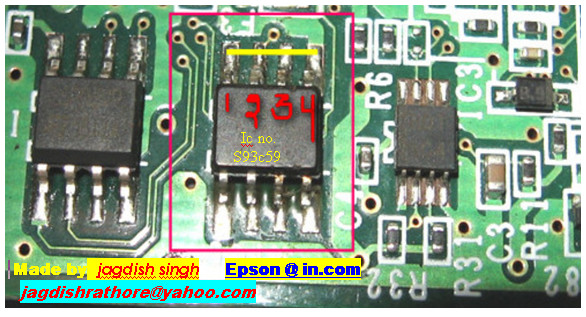
- Soldering pin no 1,2,3,4 by wire as show in PICTURE and now turn on printer for ”20 second”
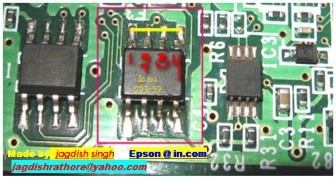
- After 20 second turn off printer and remove soldering wire from pin no. 1,2,3,4 ( back in original condition)
- Now turn on your printer
- And now your printer will be RESET

Resetter Epson stylus T10 T11 T20E TX200 TX400
Original ink cartridges Model
73N Black Ink Cartridge (Standard Ink)
73N Cyan Ink Cartridge (Standard Ink)
73N Magenta Ink Cartridge (Standard Ink)
Specifications:
* Offered with new version Combo chip with Switch and buttons.
* Can used without original Cartridge on with the Switch down
* High quality, low cost, easy maintenance
* 80ml volume of ink for continuous printing without changing cartridges
* Easy setup for long-term usage
* Designed to perform with maximum reliability, efficiency and ease of operation
* Cuts the running costs of printers by 90% because the same ink tanks can be used over and over again
How to Reset the protection counter of Epson T13 T1100 TX121 Printer
.png)
FIX PRINTER ERROR "parts inside printer end service life, waste ink pad counter overflow error"
Please follow the steps below to reset the protection counter effectively.
- Double click Adjprog.exe.
- Click “Accept” button.
- Click "Select" button. and choose your printer model then click "OK"
- Click “Particular adjustment mode” button.
- Select on “Waste ink pad counter” and click “OK” button.
- Check on Main pad counter and click on “Initialization” button and the program will reset the protection counter.
- Turn off the printer as a program instructed then turn on again.
- Click “Finish” button. and its done!
Warning: You might end up with ink leaking out of the printer if you dont either replace the waste ink pad or install external waste bin.Download Resetter Epson T13
Download Resetter Epson TX121
Download Resetter Epson T1100
Solution Ink Out error for Epson Printer

- Using Auto Reset Chips : if using original cartridges replace the original chips of cartridge with autoreset chips.
- Reset Chips of cartridges using chips resetter : some computer and printer shops usually sell chips resetter, otherwise find chips resetter You can use SSC software but at some new Epson printer this software not work (to use the software please read Resetter section on help file)
- Replace the cartridge with new cartridges : this is last solution. Before replace the cartridge ascertain beforehand if problem cause by chips, because I find some cases, ink out error is not caused by chips but cause by print head.
How to reset Epson R390 waste ink pad counter

1. Turn on the printer
2. Set the pc date setting to 1 January 2007
3. Adjprog.exe run from the extract of a folder (or locate the file or application. Exe and run it)
4. Click accept
5. Click on the particular mode adjustment
6. Go to interview Then select waste ink pad counter then click ok
7. Click "button box" until it is done then click "initialization" button and then click "finish button"
8. Turn off the printer for 5secs then turn again
9. Set the date today. download Here
Driver Download for Epson Expression Home XP 202 Driver

How to Reset Epson Stylus Color Printers
Following some ways to reset manual Epson Printers :
1. EPSON Stylus Color
- Pressing and holding ALT+FONT+LOAD+PAUSE buttons combination
- Press POWER button
- Release all buttons
3. EPSON Stylus Color 400, 600
- Pressing and holding LOAD/EJECT and CLEANING buttons
- Press POWER button and hold it until you will see blinking INK OUT and PAPER OUT leds
- Release all buttons
- In 2-3 seconds time press LOAD/EJECT and CLEANING buttons again.
4. EPSON Stylus Color 440, 640, 740, 460, 660, 670, 760, 860, 880, 1160
- Pressing and holding LOAD/EJECT and CLEANING buttons
- Press POWER button and hold it until You will see blinking INK OUT and PAPER OUT leds.
- Release all buttons.
- In 2-3 seconds time press and hold CLEANING button, until all leds will blink.
5. EPSON Stylus Color 680
- Pressing and holding LOAD/EJECT and CLEANING buttons,
- Press POWER button and hold it until You will see blinking INK OUT and PAPER OUT leds.
- Release all buttons.
- In 2-3 seconds time press and hold LOAD/EJECT button, until all leds will blink.
6. EPSON Stylus Photo 785, 895
- Pressing and holding Maintenance and Roll Paper buttons
- Press POWER button, You will see blinking Error led.
- Release all buttons.
- In 2-3 seconds time until led is blinking press and hold for 10-12 seconds Roll Paper button, until all leds will blink.
7. EPSON Stylus Photo 890, 1280, 1290
- Pressing and holding Maintenance and Roll Paper buttons, press POWER button, You will see blinking Power led
- Release all buttons
- In 2-3 seconds time until led is blinking press and hold for 10-12 seconds Roll Paper button, until all leds will blink
- In 2-3 seconds time press LOAD/EJECT and CLEANING buttons again.
8. EPSON Stylus Color 800, 850
- Pressing and holding LOAD, CLEANING Color and CLEANING Black buttons
- Press POWER button and hold it until You will see blinking INK OUT and PAPER OUT leds.
- Release all buttons.
- In 2-3 seconds time press and release CLEANING Color button, You will see leds blinking.
9. EPSON Stylus Color 900, 980
- Pressing and holding LOAD/EJECT and CLEANING buttons
- Press POWER button, You will see blinking INK OUT led
- Release all buttons
- In 2-3 seconds time press and hold CLEANING button for 10-12 seconds.
10. EPSON Stylus Color 3000
- Pressing and holding PAUSE, LF/FF and DOWN ARROW buttons
- Turn on printer.
- Release all buttons.
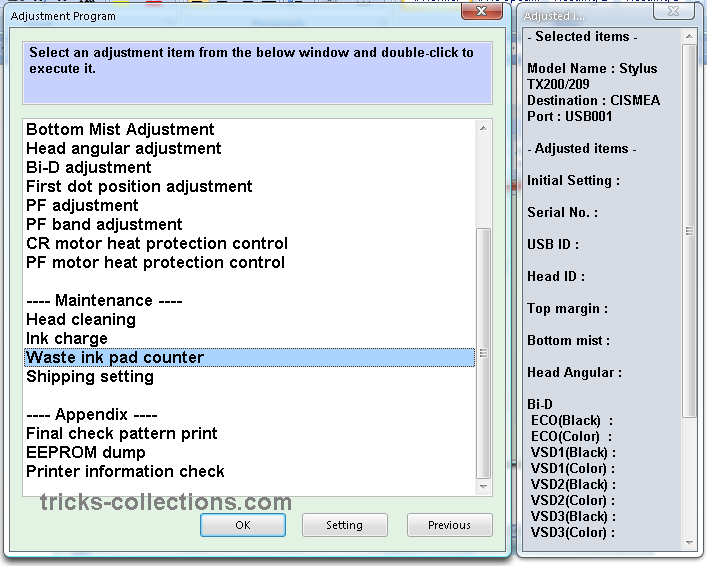
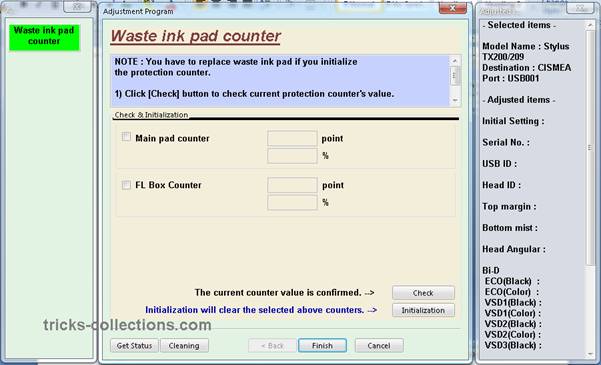
Resetter Epson TX200 – Adjustment Program Epson TX200
This software having gacility to Reset Waste Pad Counter for Epson TX200 and TX209 series. Caution, to run the program, DO NOT click directly adjprog.exe, click to Loader.exe. Otherwise program doesn’t work. This software can be used without change or change date setting.
Here screen-shot of software Resetter printer Epson TX200 or Adjustment Program Epson TX200

Caution: use this software as your own risk.
Download the software Resetter Epson TX200 or Adjustment Program Epson TX200, click this link: http://rapidshare.com/files/290833439/TX200.rar.html
alternative download link in mediafire: http://www.mediafire.com/?ztv5jivqkzj
Wic Reset v 3 01 0001 Tool For EPSON PRINTERS

FIX PRINTER ERROR "parts inside printer end service life, waste ink pad counter overflow error"
SOLVED ERROR FOR - PARTS INSIDE YOUR PRINTER ARE AT THE END OF THEIR LIFE.
SOLVED ERROR FOR - INK PADS NEED CHANGING.
SOLVED ERROR FOR - E-letter IN THE DISPLAY AND FLASHING LIGHTS.
SOLVED ERROR FOR - YOU ARE BEING TOLD TO TAKE YOUR PRINTER TO AN EPSON SERVICE CENTER.
Wic Reset TOOL Compatible WITH FOLLOWING PRINTER MODELS
Artisan: Artisan 50, Artisan 700, Artisan 710, Artisan 800, Artisan810
B: B300
BX: BX300F, BX310, BX600, BX610, B1100
C: C58, C59, C63, C64, C65, C67, C68, C76, C77, C78, C79, C82, C83, C84, C85
C86, C87, C88, C90, C91, C92, C93, C94, C95, C97, C98, C99, C110, C120
CX: CX2800, CX2900, CX3100, CX3200, CX3300, CX3400, CX3500, CX3600, CX3650,
CX3900, CX4100, CX4500, CX4600, CX4700, CX4900, CX5700F, CX5900, CX6300, CX6400,
CX6500, CX6600, CX7300, CX8300, CX8400, CX9300F, CX9400Fax, CX9500F
D: D68, D78, D88, D92, D120
DX: DX4200, DX4800, DX5000, DX7400, DX8400, DX9400F
ME: ME30, ME32, ME70, ME300, ME320, ME360
NX: NX200, NX300, NX305, NX400, NX410, NX415, NX420W, NX510
P: P50, P60
PX: PX610, PX650, PX659, PX660, PX700W, PX710W, PX720WD, PX800FW, PX810FW
Photo: Photo 820, 830, 950, 1390, 1400, 1410
PictureMate: PM100, PM210, PM215, PM225 PM235, PM240, PM250, PM260, PM270, PM280,
PM290, PM310, PM-G4500
R: R200, R210, R220, R230, R240, R245, R250, R260, R265, R270, R280, R285,
R290, R295, R300, R310, R320, R330, R340, R350, R360, R380, R390, R800,
R1800, R1900, R2400, R2880
RX: RX420, RX425, RX430, RX500, RX510, RX520, RX530, RX560, RX565, RX580, RX585, RX590, RX595,
RX600, RX610, RX615, RX620, RX630, RX640, RX650, RX680, RX685, RX690, RX700
S: S20, S21, S22
SX: SX100, SX105, SX110, SX115, SX117, SX125, SX200, SX205, SX210, SX400,
SX405, SX410, SX415, SX420W, SX425W, SX510, SX515, SX600, SX610
T: T10, T11, T13, T20, T21, T23, T24, T26, T27, T30, T33, T40W, T50, T59,
T60, T1100, T1110
TX: TX100, TX101, TX102, TX103, TX105, TX106, TX109, TX110, TX111, TX115, TX117, TX119, TX121
TX200, TX209, TX210, TX219, TX220, TX300F
TX400, TX405, TX408, TX409, TX410, TX419, TX420W
TX510FN, TX515FN, TX550W, TX600FW, TX650, TX659
TX700W, TX710W, TX720WD, TX800FW, TX810FW, TX820FWD
WorkForce: WorkForce 30, 40, 310, 315, 600, 610, 1100 download here
Epson printer test pages
Stylus series:
- Stylus C88
Epson R230 how to reset when you getting error?
Printer Epson R230 6 colors is very great for photo printing but sometimes blink alway make confused and annoying.This error cause you need to reset it. dont worry you can follow this guide to fix it
1. first Turn ON Epson R230
2. must download tools Epson R230 i will tell later
3. then when you have finish download extract open the sscserve.exe to install resetter
4. Result of install is "SSC Service Utility", and run this aplication
5. Ensure that the printer connection cable installed correctly
6. Choose 'Configuration' in SSC Service Utility V4.20
7. In 'Printer Model' option choose Epson Stylus Photo R220/R230
8. Look for printer image in right bottom toolbar on your computer monitor, and right click this printer image
9. Choose 'Protection counter' and left click 'Reset Protection Counter'
10. Turn OFF your Printer and Turn ON again, your printer should be normally
this tools is free for use you can get from here
Reset Epson cx660
2.) press the "Stop (triangle)" and the "Colour copy" button and hold them
3.) press the power button to power off, still hold 2.)
4.) press the power button to power on, still holding 2.)
5.) the LEDs start to flash, then they stop to flash and the red exclamation mark starts to flash. Now release 2.)
6.) the LED should say: "Init EEprom"
7.) now press and hold the power button until the printer powers off and powers on again.
The "error message" is gone, the "protection counter" (ssc utility) is back to 0, the printer works so far.
Probably, I'll have to replace the sponge.
Epson chip TX300F and chips Epson TX410, TX415

Like the previous version of the chips is cracked by OrTHoTaMiNe, start Epson and Epson chip TX300F, TX410 TX415 do not require setting a date. All functions working chips and dont or not. Epson TX300F, TX410 and TX415 is a multifunction printer inkjet with low running costs and designed for quality prints Photo good. Download link microchips and chip Epson Epson TX300F, TX415: TX410
Chips FW Epson TX800

The adjustment of the programme or software chips for Epson TX800 FW. Epson TX800 FW is inkjet printing, scan and copy. Epson TX800FW supports Ethernet, Wi-Fi and USB connection 2 and this Pinter serial also using advanced 6 cartridge Photo MFC for print quality. There are 2 versions for Epson chip TX800FW. Download software link chips Epson TX800FW. To download the file, copy the following URL into your browser:
Printer driver for the Epson Stylus Office T40W

Download driver Epson Stylus Office T40W the printer link for Windows XP, Windows 2000, Windows Vista, Windows 7 32 and 64-bit version and Mac OSX
Epson Stylus Office T40W driver for Windows XP, Windows 2000, Windows Vista, Windows 7
Download URL
Chip Epson TX110 and TX111 Epson

Need Epson and EPson TX110 chips TX111 you can download the programme adjustments or software chips below. Not that compiling this software because I don't have a chip on both series of Epson printers.
Epson and epson TX110 TX111 is all in one inkjet printer or multifunction printer is designed for home users, which Combined a copy, print and scan functions. Epson TX110 and epson DURABrite TX111 using the Ultra and the maximum print resolution 5760 x 1440 dpi is on the A4, but this printer supports wireless connectivity.
Download chips Epson Stylus Office T1100

Download chips Epson stylus Office T1100. This software does not require setting date chips, to use the software, simply click the "AdjProg". Epson stylus Office T1100 Printer is used with high performance and individual ink cartridge 5. This support for printers to print the document and graphics to A3 + paper size.
Chip Epson B-300 and the Epson B-500DN

In need of microchips Epson B-300 and b-500DN chips, now available for download. Inkjet printer Epson B-500DN Office and epson claimed that the product to be as cheap run as equivalent lasers printer. While the Epson B-300 is the inkjet printer business. EPson B-300 is the first printer with integrated auto nozle check it out, to check the printer head and clean it if necessary.
Both serias printer (Epson B-300 and the Epson B-500DN) ideal for users of office and business.
If you need chips to the Epson B-300 and the Epson B-500DN you can download the chips on this blog. Here is a screenshot of microchips Epson B-300 and the Epson B-500DN.Click here to retrieve the chips Epson B-500 and B-300
Epson Stylus Photo TX810FW Chips

Chip Epson Stylus Photo TX810FW. Printer multifunction inkjet printer Epson Stylus Photo TX810FWis and I think, this printer is the latest version of Epson TX800FW. Epson Stylus Photo inkjet all-in-one packages with TX810FW printing CD/DVD. This printer is printing speed better than Epson TX800FW. Epson TX810FW chips can be downloaded from the following links:
Download link for chips Epson TX810
Printer driver for the Epson Stylus Office T60
Epson Stylus Photo T60 driver for Windows x 64, Windows Vista x 64, Windows 7 x 64
Download